FormM – The Electronic Form Management Software
The Electronic Form Management Software
FormM (Electronic Form Management Software) is the integrated electronic forms management module within the goPLIMS suite enabling organisations to design, pre-approve and execute custom e-forms online in a fully traceable and controlled platform. It supports efficient digital workflows and execution of digital forms for data collection, integrated with online submission replacing manual paper forms.
By combining controlled templates, unique record numbers, automatic capture of executor initials and dates, online execution, review, approval and e-signature routing in one place, FormM (Electronic Form Management Software) replaces paper and disconnected tools with a central, audit-ready repository of completed records.
FormM – Digitise operational forms with built-in compliance.
Initiate – Execute – Approve
Our Pilars
INITIATE
- Design and configure custom e-forms based on systems/process requirements.
- Get forms pre-approved online prior to releasing them for field execution.
- Incrementally execute the forms until all fields are verified.
- Store all unique in-progress forms in a dedicated, controlled repository until completion.
EXECUTE
- Allow executors to select only pre-approved forms for field execution.
- Automatically generate a unique record number for downloadable form for execution.
- Automatically capture executors’ credentials for each execution
- Enable online execution on laptop or tablet, with the option to save in draft until all execution is complete.
APPROVE
- Route completed forms for review and post-approval within the system.
- Submit all completed forms for multi-party electronic signatures.
- Maintain a complete audit trail of execution, review, approval and e-signature.
- Maintain final, approved records in a centralised, access-controlled repository for easy retrieval
Challenges & Solutions
Paper-based or scattered digital forms make it difficult to standardise data capture and ensure executors are always using the latest version.
FormM centralises all pre-approved e-forms in a controlled repository, so executors always select and use the current, standardised version.
Manual field execution and handwritten records are slow, error-prone and hard to trace.
FormM enables structured, electronic field execution on laptop or tablet, reducing errors and improving data quality and traceability.
Data integrity issues due to manual execution requiring additional scrutiny ensuring accuracy.
FormM automatically generates unique record numbers and assigns initials and dates to each execution step, giving clear ownership and traceability.
Review and approval of completed forms can be fragmented, and manual processes may lead to poor visibility and increased cost.
FormM manages review, post-approval and electronic signatures within the platform, providing a controlled, trackable end-to-end workflow.
Highlights
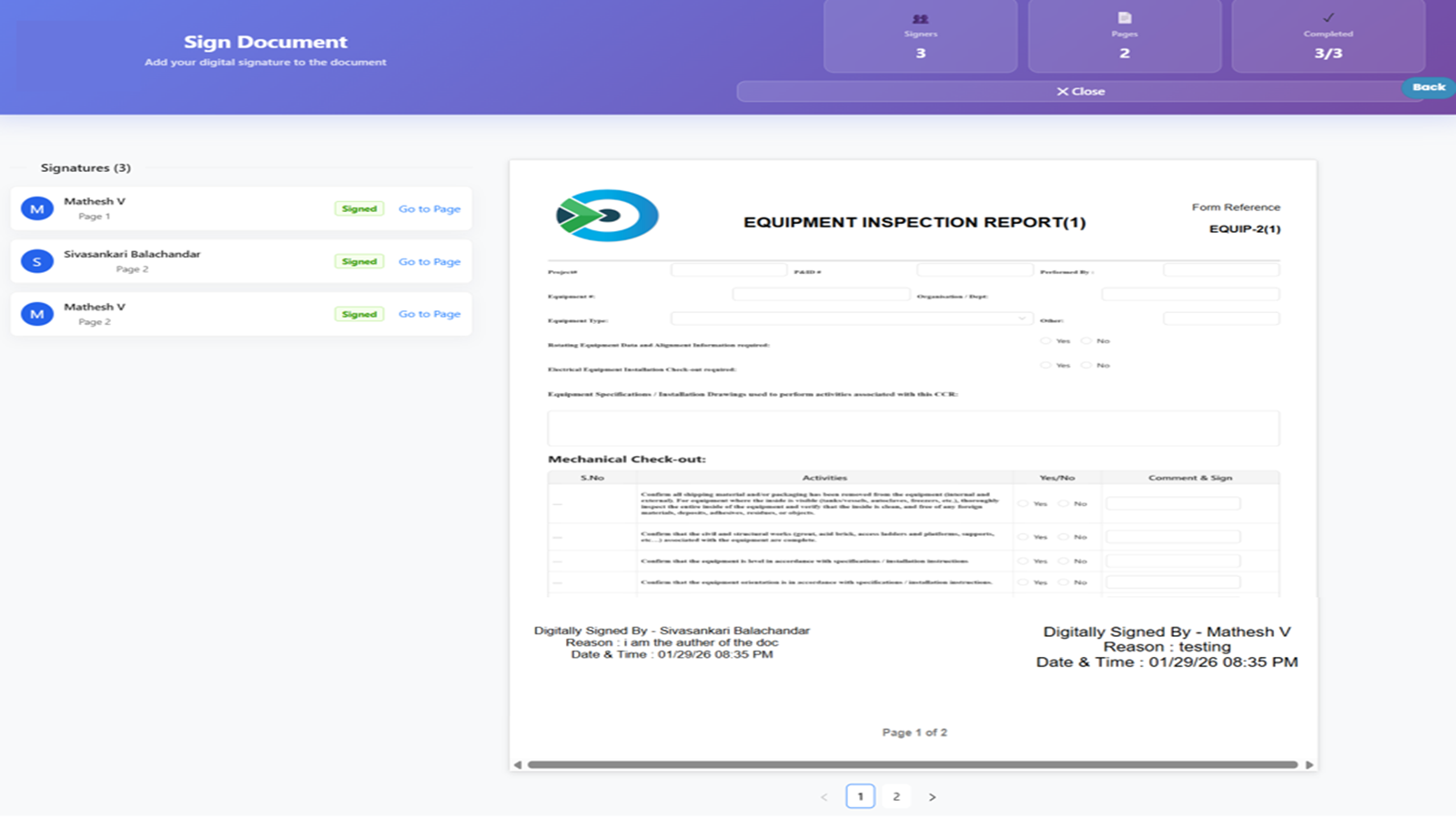
Signature
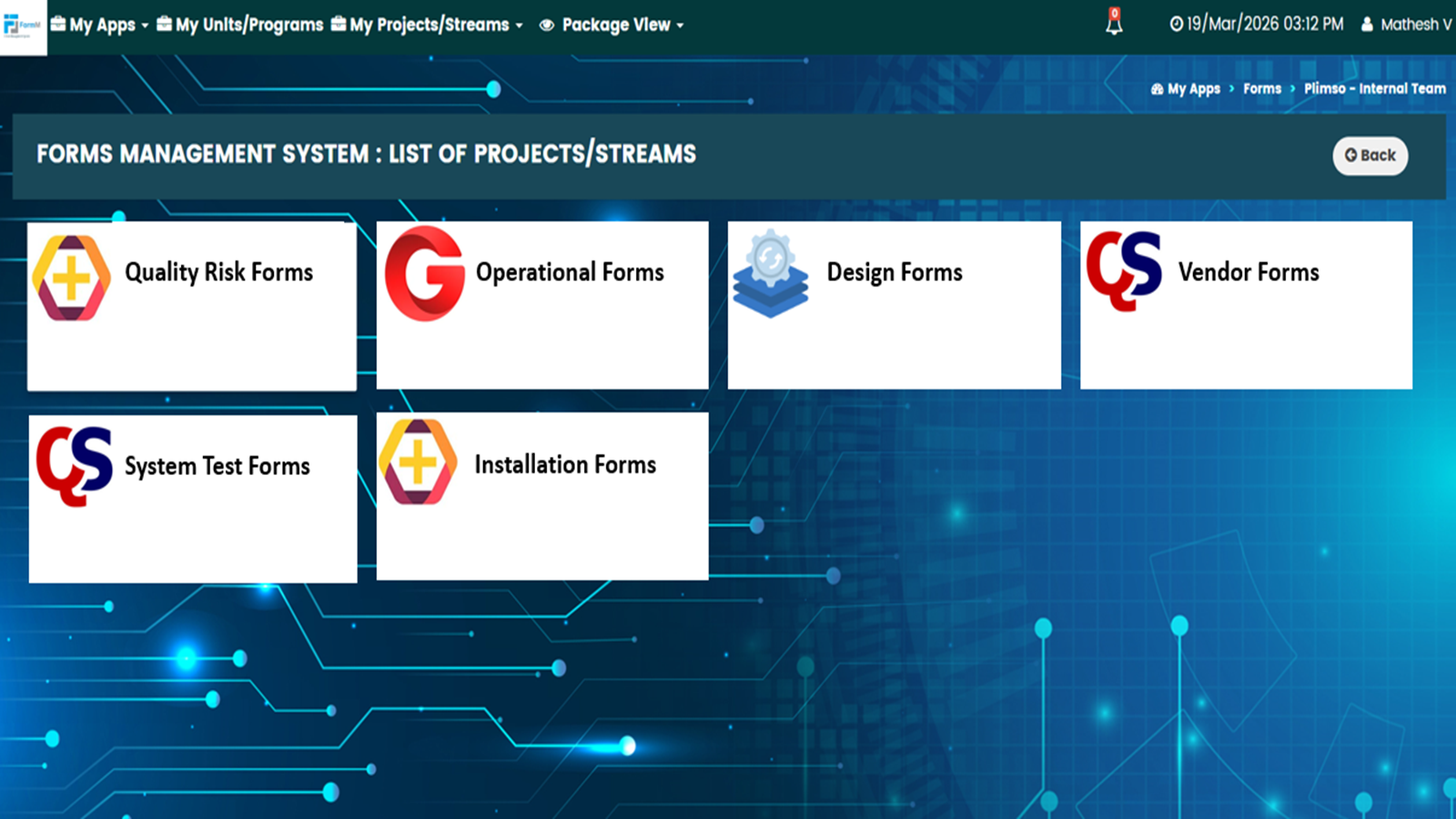
Projects
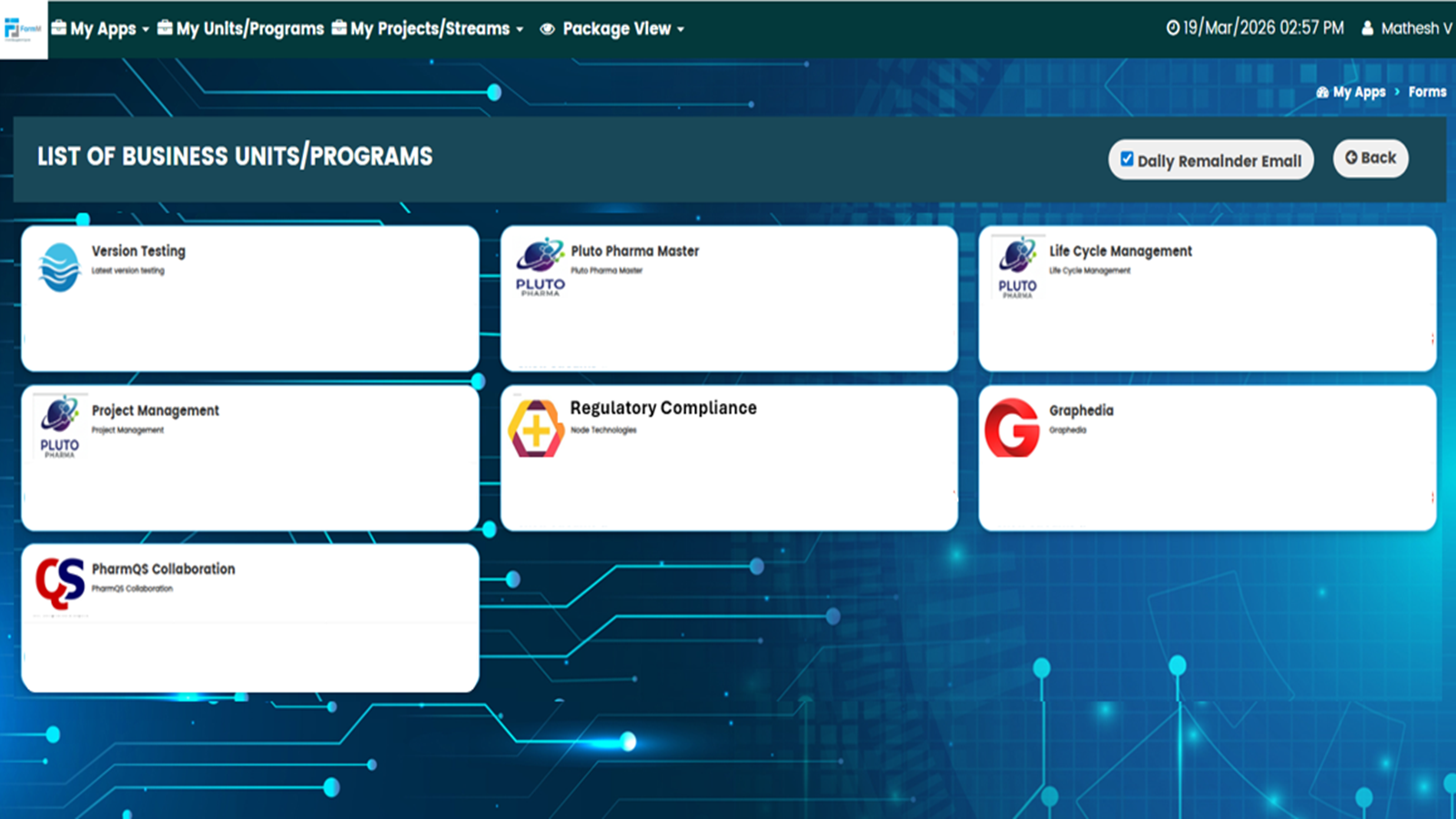
Program
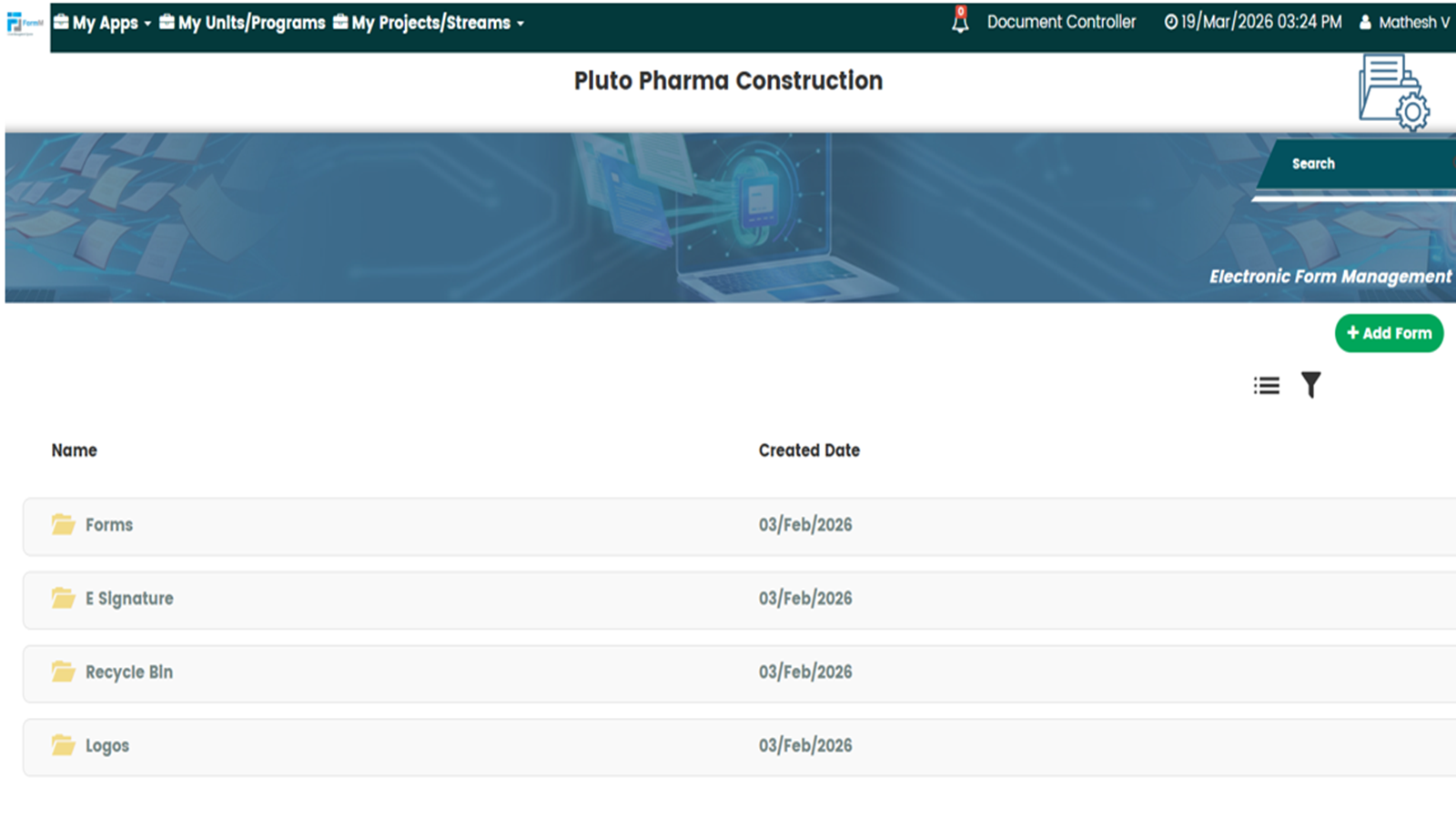
Main
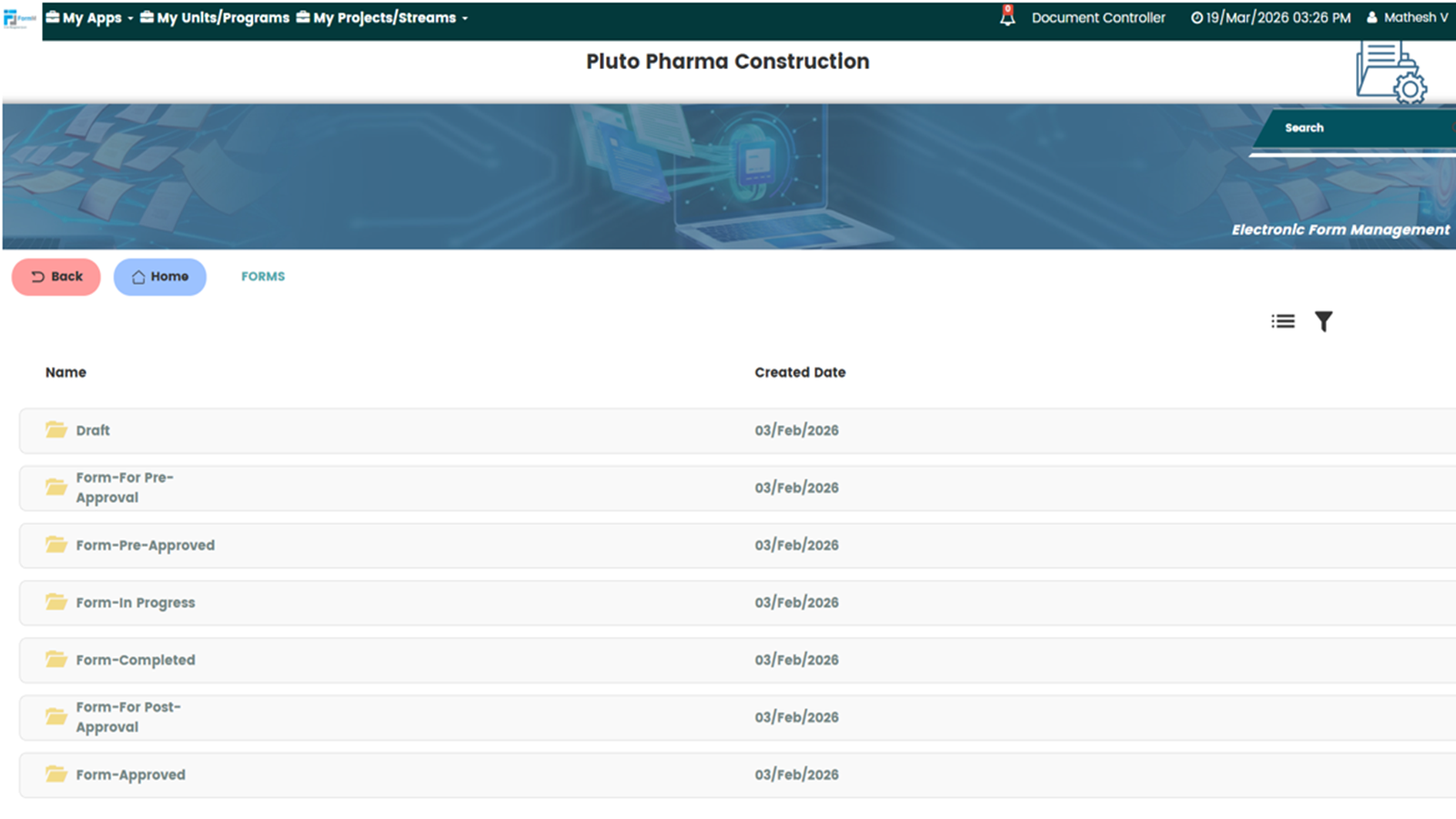
Form 1
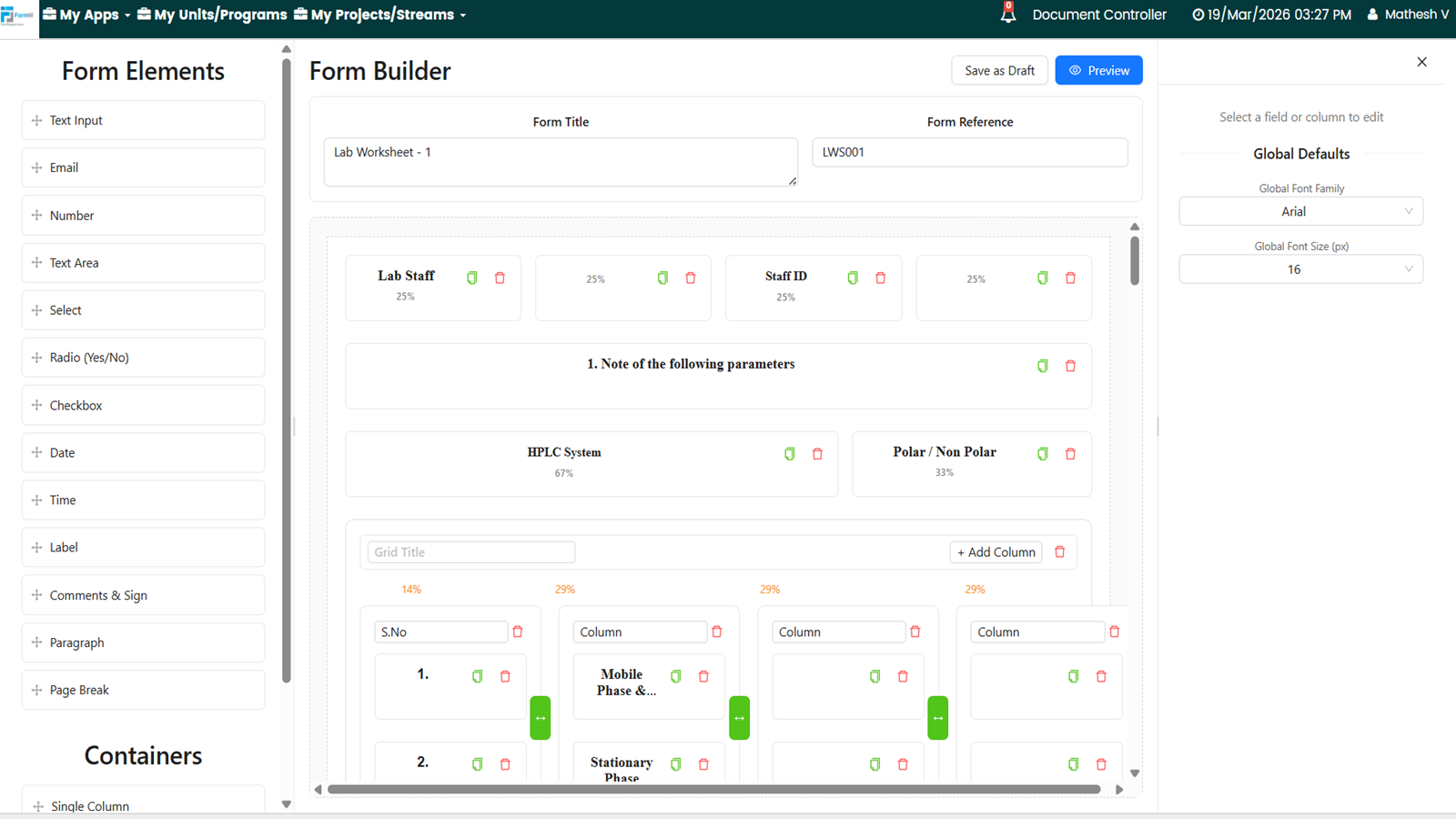
Form 2
The intelligent approach to efficiently manage forms
- Design and pre-approve custom e-forms on a central platform
- Enable online field execution on laptop or tablet
- Auto-generate unique record numbers for every execution
- Register unique executor initials and dates as work is completed
- Route completed forms for review, approval and e-signatures online
- Maintain a centralised repository of all executed records
- Support governance, traceability and regulatory compliance
Built for seamless collaborative form management
Custom E-Form Designer
Create tailored e-forms on the goPLIMS platform to match specific client, process or regulatory requirements.
Unique Record Generation
Automatically assign a unique record number each time a form is selected for execution.
Execution Drafts
Save in-progress form executions as drafts until all activities and entries are finalised.
Draft & Pre-Approval Workflow
Save forms as drafts and route them for pre-approval before releasing them for field execution.
Digital Field Execution
Allow users to complete forms electronically in the field on laptops or tablet.
Integrated Review & Approval
Route completed forms for review, post-approval and electronic signature within the system.
Controlled Form Library
Store all pre-approved forms in a dedicated folder, ensuring executors only use approved templates.
Automatic Initials & Date Capture
Register unique executor initials and dates incrementally and automatically as sections of the form are completed.
Centralised, Audit-Ready Repository
Maintain all completed and approved records in a central, secure repository with full traceability and electronic signature compliance.

End-to-End Digital Field Execution
Controlled Forms & Record Integrity
Integrated Review & E-Signature Workflow
Centralised, Compliant Record Management
FormM by goPLIMS is the integrated Electronic Form Management module within the goPLIMS suite — enabling organisations to design, pre-approve, and execute custom electronic forms in a fully controlled, traceable, and audit-ready platform. Unlike paper-based forms — which are prone to illegible entries, missing signatures, version control failures, and physical loss — FormM enforces a structured, digital execution workflow where executors can only access pre-approved, current form templates, and where every entry is automatically date- and initials-stamped in real time as it is completed. Unlike generic digital form builders such as Microsoft Forms or Google Forms — which have no pre-approval controls, no automatic unique record numbering, no incremental credential capture, no post-approval e-signature routing, and no integration with a governed document repository — FormM is a purpose-built, compliance-grade platform that manages the complete lifecycle of a form from template design to pre-approval, field execution, post-approval, and archival in a centralised, access-controlled repository. For pharma and regulated industries where a completed form is a GMP record, a clinical data collection instrument, or a quality evidence document, FormM provides the governance and traceability that generic tools cannot.
FormM is built around three core pillars that reflect the complete, compliant lifecycle of any electronically managed form. Initiate: custom e-forms are designed and configured to match the specific requirements of the process, system, or regulatory framework they serve. Before any form is released for field execution, it undergoes a formal pre-approval process — reviewed and approved by the appropriate stakeholders online within the platform. Only pre-approved forms are available for executors to select, ensuring that no team member can execute an unapproved, outdated, or incorrect form. In-progress forms are stored in a dedicated controlled repository until execution is complete, preventing incomplete records from being lost or accessed prematurely. Execute: executors select only from the library of pre-approved forms. When a form is selected for execution, a unique record number is automatically generated — providing an individual, traceable identity for each completed form instance. As execution proceeds, the executor’s credentials — initials and the date — are automatically captured and registered incrementally as each section of the form is completed, without requiring manual entry. Execution can be completed on a laptop or tablet in the field, with a draft save option available so that execution can be paused and resumed without data loss. Approve: once execution is complete, the form is routed for review and formal post-approval within the platform. Multi-party electronic signatures are collected in the configured sequence, and the completed, signed record is archived in a centralised, access-controlled repository with a full audit trail of every execution, review, approval, and signature event.
One of the most persistent data integrity risks in regulated form-based data collection is the use of outdated, unapproved, or incorrect form versions — a problem that is endemic in environments where forms circulate as email attachments, paper copies, or uncontrolled PDF files. FormM eliminates this risk through its controlled form library and mandatory pre-approval workflow. Every new form template — or revision to an existing template — must go through the formal pre-approval process before it is released into the controlled library. Pre-approval routes the form design to the required reviewers and approvers online within the platform, collecting the necessary sign-offs before the form is published. Once pre-approved, the form is available in the controlled library and executors can select it for execution. Critically, executors can only see and access pre-approved forms — they cannot select an in-development form, a superseded version, or an unapproved draft. When a form is revised and re-approved, the previous version is automatically superseded in the library, ensuring that the current approved version is always the only one available for new executions. This pre-approval gate is one of the most practically important compliance controls in FormM, and it directly addresses the version control failures that are among the most common form-related findings during GMP inspections.
In regulated environments, every completed form instance must be uniquely identifiable, traceable to the individual who executed each step, and time-stamped with when each entry was made — requirements that paper forms struggle to satisfy reliably and that generic digital tools do not address at all. FormM addresses all three requirements automatically, without relying on manual entry by the executor. When a pre-approved form is selected for execution, FormM automatically generates a unique record number for that specific execution instance. This unique number is embedded in the form record from the moment it is created, giving every completed form an individual, searchable, and retrievable identity that cannot be duplicated or confused with another execution of the same form template. As the executor completes each section of the form, their credentials — initials — and the date of completion are automatically captured and registered against that specific section in real time, without requiring the executor to manually write or type their initials and date in each field. This incremental, automatic credential capture means that the record of who completed each part of the form, and when, is always accurate, always present, and always traceable — regardless of whether the form was completed in a single session or across multiple sessions using the draft save function.
FormM is designed to support the full spectrum of structured data collection needs in pharmaceutical projects and operations — wherever a controlled, pre-approved form template needs to be executed in the field and retained as a GMP-quality record. During Commissioning, Qualification and Validation, FormM can manage IQ, OQ, and PQ test execution forms — with custom-designed templates for each test, pre-approval by the validation team and QA before execution begins, incremental credential capture as each test step is performed and recorded, and post-approval e-signature routing upon test completion. For batch manufacturing, FormM can support the electronic execution of in-process check forms, environmental monitoring data collection sheets, equipment cleaning records, and other forms that are typically managed as paper-based manufacturing records. For clinical trials, FormM can support the execution and traceability of site visit checklists, monitoring report forms, and protocol deviation capture forms. For quality operations, FormM can manage internal audit forms, supplier qualification questionnaires, and training completion records — all executed digitally, with automatic credential capture and post-approval routing to eliminate the paper-based handling that slows these processes down and creates traceability gaps.
In real-world field execution environments — a qualification test that runs across a full working day, a batch record that spans multiple process steps over several hours, or a site audit form that covers multiple areas of a facility — it is rarely possible to complete a form in a single uninterrupted session. FormM’s draft save functionality addresses this directly by allowing executors to save an in-progress form execution at any point and return to complete it later, without any risk of data loss. The partially completed form is stored in a dedicated controlled repository for in-progress records, keeping it separate from both the pre-approved template library and the completed records archive — ensuring that it cannot be confused with a finished, submitted record and cannot be accessed by unauthorised users. All entries made prior to saving — including automatically captured credentials and dates — are retained in full when the executor returns to complete the form. This draft save capability is particularly important for maintaining accurate incremental credential capture in long-form execution: because each section’s initials and date are automatically captured at the moment of completion, a drafted form accurately reflects exactly which sections were completed by which person on which date — even if execution spanned multiple sessions or was completed by different authorised executors.
Once a form execution is complete, FormM routes the completed record through a structured post-approval and electronic signature workflow without requiring the executor or the approver to use any external tool or system. The completed form is submitted within the platform and routed to the designated reviewers and approvers in the configured sequence. Each reviewer can access the completed form — including every field entry, every automatically captured credential, and the full execution history — and apply their review comments or formal approval. Multi-party electronic signatures are collected through FormM’s integrated e-signature capability, with each signatory authenticated and the signing event logged in the tamper-evident audit trail. The sequence of signatures is enforced digitally — a post-approval signature cannot be applied before the preceding review or approval in the sequence is confirmed — ensuring that no form record is closed without the full required sign-off chain being completed. Once all signatures are collected, the completed and fully approved record is archived in the centralised, access-controlled repository, where it is immediately retrievable for quality review, regulatory inspection, or project close-out purposes. For organisations managing high volumes of form-based GMP records — validation test forms, batch documents, audit records — this automated post-approval and archival workflow eliminates the manual routing, chasing, and filing that consumes significant quality and administrative resource in paper-based systems.
FormM is designed so that every completed form record is inspection-ready from the moment it is submitted for approval — not just when a regulatory visit is imminent. The combination of pre-approved templates, unique record numbers, automatic incremental credential capture, draft-controlled execution, and post-approval e-signature routing creates a form record that satisfies the data integrity expectations of FDA, EMA, and HPRA regulators without requiring any additional manual documentation or post-execution manipulation. Every completed form in FormM has a complete, tamper-evident audit trail — showing which pre-approved template was used, when the form was selected for execution, what was entered in each field and by whom, when each section was completed, how the post-approval workflow progressed, and when the final electronic signature was applied. This level of automatically generated, inherent traceability directly addresses the ALCOA+ data integrity principles — Attributable, Legible, Contemporaneous, Original, Accurate — that regulatory authorities apply to all GMP records. For pharma organisations that have received data integrity observations related to paper form records — missing initials, undated entries, unapproved form versions, or incomplete approval chains — FormM structurally prevents each of these failure modes from occurring, rather than relying on procedural controls and human diligence alone.
No two regulated organisations have identical form requirements — a pharmaceutical manufacturer’s in-process check form has different fields, layouts, and data types than a clinical trial site activation checklist, a CQV test execution record, or a supplier qualification questionnaire. FormM’s custom e-form designer allows organisations to create tailored electronic form templates from scratch, configured to match the specific fields, layouts, data types, and instructions required for each individual form type. Fields can be configured as text entries, numeric values, date selectors, dropdown menus, check boxes, pass/fail indicators, or multi-line comment fields — mirroring the structure of existing paper forms or improving on their design. Instructions and guidance notes can be embedded within the form to guide executors through each step. Conditional logic can be applied so that certain fields or sections only appear based on earlier entries — for example, a fail result triggering a deviation comment field. Forms can be designed to span multiple sections representing different stages of a process, with each section independently credentialled as it is completed. For organisations with a wide variety of existing paper form types — from simple single-page checklists to complex multi-section test records — FormM’s designer provides the flexibility to digitise every one of them without compromising their specific structure or regulatory intent.
FormM is a core module within the goPLIMS Integrated Project Execution Platform, and it is designed to connect seamlessly with the broader suite at every stage of the form lifecycle. EDocM integration: completed and approved form records are stored and managed in the centralised, access-controlled document repository provided by EDocM — giving all completed forms the same version control, access governance, and retrieval capability as any other controlled document in the project. DiscrepM integration: where form execution uncovers a deviation — a test result outside its acceptance criterion, a process parameter that could not be met, or a data entry that cannot be verified — a linked discrepancy record can be raised in DiscrepM, connecting the form-based evidence of the deviation to the formal investigation and corrective action record. ActionR integration: actions arising from form review or approval — additional data required, corrections needed, or follow-up tests to be scheduled — can be assigned and tracked in ActionR. ChangeM integration: where completed forms identify the need for a change to a process, procedure, or specification, the linked change record is managed in ChangeM. This end-to-end integration means that a completed FormM record is not an isolated data point — it is a connected, traceable node within the full goPLIMS quality and project execution ecosystem, providing the comprehensive audit trail that regulatory authorities and quality management systems demand.
Yes, FormM supports the digitalisation of deviation and exception management by enabling structured, standardised data capture for deviations, observations, and exception events in a compliant environment.
In pharmaceutical and regulated industries, deviations often originate from manual data capture processes such as paper forms, checklists, and site observations. FormM replaces these with digital, configurable forms, ensuring that all deviation-related information is captured accurately and consistently at the source.
With FormM, teams can:
- Capture deviations, exceptions, and observations in real time
- Standardise data entry using predefined templates and fields
- Attach supporting evidence such as photos, documents, or comments
- Integrate captured data directly into workflows (ActionR, PunchM, ChangeM, etc.)
Each record is:
- Time-stamped and traceable
- Linked to relevant projects, batches, or workstreams
- Stored in a centralised, audit-ready system
With role-based access control, only authorised users can submit, review, or modify form data, ensuring compliance and data integrity.
By digitising data capture, FormM reduces manual errors, eliminates paper-based processes, and ensures that all deviations and exceptions are accurately recorded, structured, and ready for further action and compliance review.
Yes, FormM supports knowledge management by capturing structured, standardised data that can be analysed, reused, and transformed into actionable insights across projects and operations.
In pharma environments, a significant amount of knowledge originates from field data—inspections, observations, checklists, and operational inputs. FormM ensures this data is not lost or fragmented by storing it in a structured and searchable format.
Over time, this enables organisations to:
- Build a repository of structured operational knowledge
- Identify trends, recurring issues, and improvement opportunities
- Standardise best practices across projects and sites
- Support audits, training, and continuous improvement initiatives
With configurable templates, searchable records, and integration with dashboards (TrackR), FormM turns raw data into meaningful insights.
By embedding knowledge capture at the point of data entry, FormM helps organisations move from unstructured information to structured intelligence, supporting better decision-making, compliance, and operational excellence in regulated industries.
Book your Demo Today!
Design custom e-forms, get it pre-approved, complete execution online on a laptop/tablet, register credentials on completion and submit for post-approvals for e-signature. Integrate completed forms with E-DocM.